By the Drake Burning Bridges AI team
Can I Turn My Photo into a Drake Burning Bridges AI Video?
Use one portrait for a Burning Bridges party video. See photo-and-video examples, input requirements, what the reference controls and what may vary.
Yes. You can use one clear portrait to create your own Burning Bridges party video. Your photo guides the lead character's appearance, and the prepared reference guides the scene and movement. You do not need to film yourself dancing, upload a reference video or write a prompt.
Watch the examples with their input photos first. They help you decide whether the prepared party scene is the version you want before purchasing a video pack.
What does my photo control?
Your portrait gives the generator a visual reference for the main subject: their face, hair and visible appearance. The built-in video supplies the party setting, gestures and camera movement. You provide the person; the studio provides the prepared scene and music.
The AI generates a new video rather than applying a face overlay to the original clip. Facial likeness, hands, clothing and background details can vary. Choose a clear portrait with an unobstructed face.
Which photo should I upload?
Choose one person, with a clear, unobstructed face and enough light to distinguish facial features. Avoid group pictures, heavy filters, sunglasses that hide the face, motion blur and distant subjects. Use a photo you have permission to use.
The studio accepts JPG, PNG or WebP up to 10 MB. You only need one portrait. You do not need to record dance footage or take a photo in a party setting. If several photos could work, choose the one where the subject is easiest to recognize rather than the one with the most dramatic background.
Compare three photo-and-video examples
These demonstration samples are approximately 20 seconds in 480p, horizontal 16:9, with music. Compare each input portrait with its party preview to understand the scene and the details that can vary. The yellow-shirt sample is also the studio's visual reference.
Red tee, wavy hair
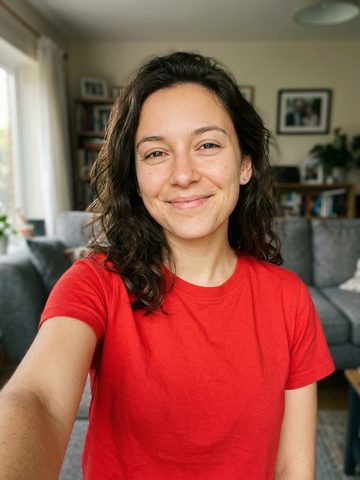
Play the red-shirt example. Compare the visible face and hair in the portrait with their appearance throughout the clip, including moments when the subject turns.
Yellow tee, beard
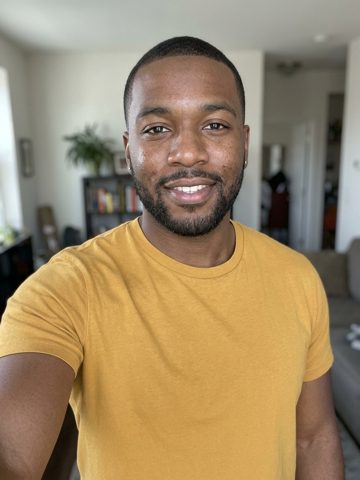
Play the yellow-shirt example. Watch the scene, gestures and camera movement to understand the prepared reference used by the studio.
Blue tee, long blonde hair
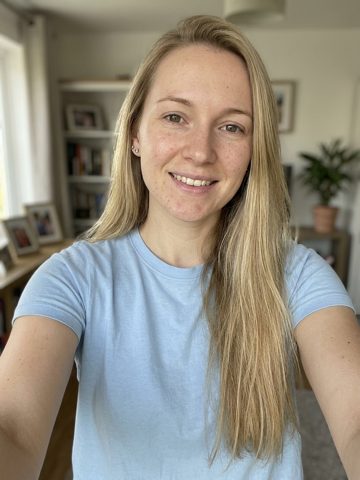
Play the blue-shirt example. Compare the face, long hair and motion across the full video rather than judging only its opening frame.
What will I download?
Your download is a 20-second, 720p MP4 in horizontal 16:9 with music included. That differs from the 480p demonstration files above. It does not generate a vertical 9:16 version directly. If you want a vertical social post, plan your crop or layout in an editor and check that it keeps the subject visible.
Sign in with Google, upload your portrait and purchase a one-time video pack. Start the generation and check My videos for its status and download. The step-by-step making guide covers the complete process.
Uploaded photos are kept for up to 7 days and completed videos for 30 days. Download the finished MP4 before its online storage expires.
Does my photo make the exact original dance?
The reference guides movement, but this is a newly generated party video. It is not a promise of identical choreography, expressions or camera timing. If you want to choose your own footage or change the scene, read the tool comparison.
Our previews are free; personal generation is paid. Read what is free and what a pack includes, then make my Burning Bridges AI video.